


Sorax: AI Video Maker & Image
2.33.00 Reviews
App Specs
- Version
- 1.0.2
- Updated On
- License
- Free
- Downloads
- 50,000+
- Developer
- White Warrior
- Categories
- Lifestyle
- Platform
- Android
Screenshots
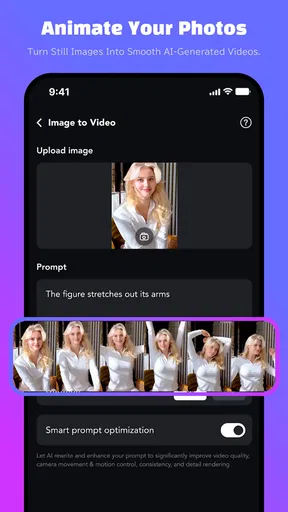
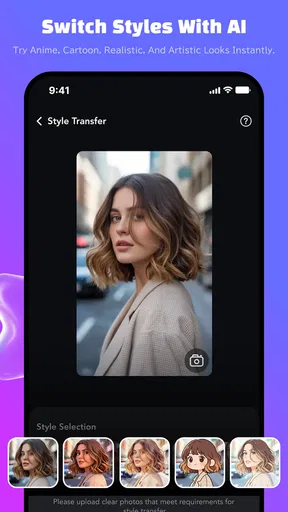

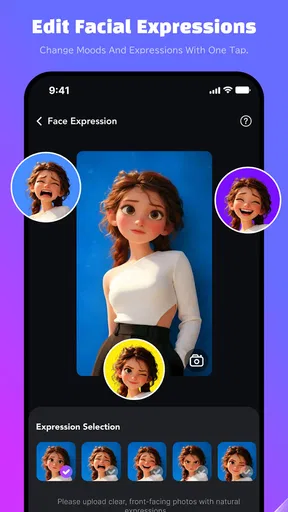
 Analysis by AppCompare
I approached Sorax: AI Video Maker & Image as a quick creative tool rather than a full editing suite. Its purpose is easy to understand: turn photos into cinematic-looking animations, add video effects, and experiment with visual styles through AI. That makes it interesting for people who want something more expressive than a static picture without learning a complicated timeline editor.
My overall impression is mixed. Sorax has a clear appeal for casual creators who enjoy trying visual transformations, but its relatively low average rating of 2.3 from around 36 ratings suggests that the experience has not been equally convincing for everyone. I would treat it as a free app worth testing, not as a dependable replacement for a mature video editor.
How Sorax feels in its current state
The app comes from White Warrior and sits in the Lifestyle category, although its practical use is closer to casual visual creation. The store summary focuses on cinematic photo animation, video effects, and styles, while the short description is simply “Sorax.” That leaves the actual attraction to the creative process itself: choose an image, apply an effect or style, and see how the result changes.
That simplicity can be a strength. I do not need to understand professional editing terms to see why someone would open it. A vacation photo, a portrait, or an image made for a social post can become a short visual experiment. Instead of spending time adjusting keyframes, transitions, and color settings, I can start with the idea I want and let the app handle much of the transformation.
At the same time, AI creation is rarely as predictable as ordinary editing. A conventional editor gives me direct control over trimming, timing, overlays, and adjustments. Sorax is more appealing when I want surprise and speed, but less suitable when I need every detail to remain exactly where I placed it. That distinction is important before downloading it.
The app is free to install, which makes trying it relatively low-risk. It does include in-app purchases ranging from $1.99 to $99.99 per item, so I would avoid assuming that every creative option or extended use is included at no cost. I would first explore the available workflow and only consider paying after deciding whether the results are genuinely useful for my own projects.
It is rated for Mature 17+ users. That age label is something families should take seriously, especially if the app is being considered for a younger teenager. I would not recommend treating it as a general-purpose children’s creativity app simply because its main activity involves photos and videos.
Worth Reading Before You Choose

Flipboard Shows What News Apps Must Do Beyond the Feed

Switching to Android Auto Means Rethinking Your Driving Routine

Google Calendar Makes a Crowded Week Easier to Manage

Ludo King Makes the Most of the Minutes Between Plans

Baby Panda World Brings Quick Play to Modern Phones, but Its Game Library Feels Busy

ESPN’s Live Game View Makes Following Close Games Easier
The practical workflow I would use
For a normal everyday project, I would begin with one strong image rather than a crowded collage. A clear subject gives an AI animation tool a better starting point than a photo with several people, heavy motion, or a confusing background. This is one of the most useful habits with an app like Sorax: simplify the input before judging the output.
For example, imagine I have taken a portrait during an evening walk and want a short post for friends. I would pick the sharpest version, try a restrained cinematic style first, and compare that result with a more dramatic effect. If the face or background becomes distracting, I would return to the original image and try a different visual direction instead of repeatedly forcing the same style.
This approach also helps conserve patience. AI effects can be tempting to test one after another, but not every variation improves the image. I find it more productive to decide what the picture needs before opening the effect menu: gentle movement, a stronger mood, a stylized look, or simply a more dynamic presentation.
A second useful workflow is to create variations for different destinations. A subtle animation may work better for a personal message, while a bolder treatment may suit a social story. I would keep the original photo untouched and treat each generated version as a separate experiment. That way, a disappointing result does not replace the source material I actually wanted to preserve.
What the current release tells me
Sorax is currently at version 1.0.2 and was released on May 23, 2026. Those details make me view it as an early product rather than a fully mature creative platform. The version number suggests that the app is still near the beginning of its development path, so I would expect the experience to be judged more by its present usefulness than by promises about what it might become.
There is a meaningful difference between an early release with an exciting idea and a polished editor that has already solved the everyday annoyances of creation. Sorax appears to be in the first group. Its concept is easy to grasp, but the rating indicates that the execution may still feel uneven for some users. I would therefore keep expectations realistic when installing it.
The release information is also relevant for existing users. Someone who installed an earlier build should check whether version 1.0.2 feels more stable or easier to use than the version they remember. However, I would not assume that a newer version automatically changes the app’s basic character. A small version increase does not by itself turn an experimental AI tool into a professional editor.
For new users, this means the best test is a short, low-pressure project. I would not begin with an important family video, a client deliverable, or a time-sensitive post. I would use an ordinary photo, explore the available effects, and decide whether the visual results justify keeping the app installed.
Where it can fit into daily life
The strongest use case is casual sharing. If I want to make a still image feel more alive for a message or social update, Sorax offers a more direct route than opening a full editing application. It could also be useful for someone who enjoys making mood-based visuals from travel photos, outfit pictures, food images, or personal snapshots.
I can also see value for people who are not confident with traditional editing controls. Many mobile editors offer impressive tools, but the number of sliders and buttons can make a simple project feel like work. An AI-focused workflow can be more inviting because the user begins with an image and a creative intention rather than a blank timeline.
Another non-obvious use is idea generation. Even when I do not use the final animation, a style experiment can show me how a photo might work as a poster, a short intro, or a visual mood board. In that role, Sorax is less a finishing tool and more a way to explore directions quickly.
There is a trade-off, though. If I need clean branding, exact text placement, controlled pacing, or repeatable results across a series of images, I would choose a conventional editor instead. AI effects are useful for discovering a look, but consistency is usually easier when I control the process manually.
What existing users should know before relying on it
People who already use Sorax may appreciate its low barrier to experimentation, but I would still keep copies of original images and finished exports outside the app. That is sensible with any creative application, especially one that is still early in its release history. The original file is the important asset; the AI version is an interpretation.
I would also avoid building a large personal workflow around one favorite effect. If a style changes, becomes unavailable, or produces different results after an update, a project based entirely on that look may be difficult to reproduce. Saving the source image and noting the general creative approach gives me more flexibility than relying on memory.
For repeated projects, I would compare outputs side by side rather than judging each result immediately after generation. The most dramatic version is not always the most usable. A quieter animation may preserve the subject better, look less artificial, and work more naturally when viewed by friends who were not part of the creation process.
The purchase structure deserves attention here as well. Because the app is free but offers items from $1.99 up to $99.99, existing users should check the cost of anything they are about to unlock before confirming a transaction. I would especially avoid paying while still learning the basic workflow. First determine whether the free experience matches your needs, then decide whether a paid item adds enough value.
Where Sorax still falls short
The biggest concern is predictability. A photo animation can look creative in one attempt and awkward in another, particularly when the image contains faces, hands, fine details, or layered backgrounds. I would not use the app for a result that must be accurate on the first try. It is better suited to flexible personal content where an unexpected visual change is acceptable.
The rating of 2.3 is another reason to be cautious. A rating is not a complete technical diagnosis, but it does signal that the current experience has not satisfied many early users. With only a small number of ratings, I would not treat it as a final verdict, yet I would take it seriously enough to test the app before investing money or time in a major project.
There is also a gap between cinematic style and cinematic storytelling. Applying a dramatic look to a photo does not automatically create a well-paced video. If I want a sequence with a clear beginning, middle, and ending, I still need a more structured editor. Sorax may help with individual visual moments, but it should not be mistaken for a complete production environment.
Users who need detailed export control, precise audio work, layered compositions, or dependable batch production may feel limited. I would choose another option for professional assignments, business content, or a project where revisions need to be repeated exactly. Sorax makes more sense when the goal is personal expression rather than technical control.
The Mature 17+ rating may also make it unsuitable for shared family devices or younger creators. Even if a particular project is harmless, the age classification should guide the installation decision. Parents looking for a simple animation tool for children would be better served by an app designed and rated for that audience.
How it compares with ordinary alternatives
Compared with a standard photo editor, Sorax is more focused on movement and visual transformation than on careful correction. A traditional editor is usually the better choice for cropping, retouching, exposure changes, and precise composition. Sorax becomes more interesting when the still image itself is only the starting point.
Compared with a timeline-based video editor, it is likely to feel faster for a single visual idea but less complete for a finished production. A timeline editor gives me control over clips, timing, sound, and arrangement. Sorax is the shortcut I would try when I want an animated image without assembling every element manually.
Compared with other AI-style creative tools, its appeal depends on whether its particular visual treatments match my taste. The store description establishes the focus on cinematic animation, effects, and styles, but a description cannot guarantee that every result will suit every photo. I would compare actual outputs rather than choosing solely because an app uses AI.
My rule would be simple: use Sorax for discovery, quick sharing, and playful transformations; use a conventional editor for reliability, repeatability, and detailed finishing. The two approaches can even work together. I could generate an interesting animated moment in Sorax, then use another editor for trimming, captions, sound, or final arrangement.
Who should try it and who should skip it
I would recommend trying Sorax if you regularly share photos and want a faster way to make them feel dynamic. It is also worth a look if you enjoy testing visual styles, do not mind occasional imperfect results, and prefer an approachable creative experiment over a technical editing lesson.
I would be more hesitant to recommend it to professional creators, businesses, or anyone working under a strict deadline. The low average rating and early version make it difficult to treat the app as a dependable production tool. For those users, predictable controls and repeatable exports matter more than the novelty of an AI transformation.
I would also skip it if your main goal is ordinary photo correction. Sorax’s appeal is not that it replaces every camera or editing utility. If all you want is to brighten an image, remove a distraction, or resize a picture, a dedicated photo editor will probably be clearer and more efficient.
What I would watch next
The most important sign of progress will be whether future releases make the creative process more dependable without removing its simplicity. I would look for smoother handling of difficult images, clearer control over the intensity of effects, and a more obvious distinction between free tools and paid items. Those changes would directly address the concerns I have with using an early AI creator.
I would also watch how White Warrior responds to the experience of existing users. Since the app is still at version 1.0.2, its long-term value will depend on continued refinement rather than on the initial idea alone. Better consistency would make it easier to recommend for recurring projects, while clearer controls would help users understand why one result works and another does not.
For now, my advice is to install it with modest expectations, use a few personal photos, and judge the results for yourself before spending anything. Keep the original files, treat generated clips as experiments, and move important work to a more established editor when precision matters. That approach lets you enjoy Sorax’s creative side without asking it to do a job it may not yet be ready to handle.
In the end, Sorax: AI Video Maker & Image is an intriguing free lifestyle app for quick AI-powered visual experiments, but it is not an automatic recommendation for everyone. I like the idea of turning a still photo into something more cinematic, and I can see genuine value for casual sharing and inspiration. Still, the early version, Mature 17+ rating, paid items, and modest user reception make caution sensible. I would keep it as a playful tool for low-stakes projects, while choosing a conventional editor whenever control, consistency, or professional reliability is the priority.
Pros
- Creates videos from text prompts without advanced editing skills.
- AI-generated images can be turned into short animated clips.
- Useful templates help speed up social media content creation.
- Supports quick experimentation with different visual styles.
- Simple interface makes basic video creation approachable for beginners.
Cons
- Output quality can vary noticeably between different prompts.
- Some advanced tools may require a paid subscription.
- AI rendering may take longer during busy periods.
- Generated videos may need manual editing to look polished.
- Results can consume significant storage when exporting many clips.
FAQs for Sorax: AI Video Maker & Image
What is Sorax: AI Video Maker & Image used for?
Sorax: AI Video Maker & Image is designed for creating visual content with artificial intelligence. It can help transform written prompts or images into creative videos and generate AI-assisted artwork. The app is aimed at users who want to produce social media posts, short clips, concept visuals, and experimental designs without needing advanced video-editing or graphic-design skills.
Does Sorax require any previous video-editing or AI experience?
No advanced experience is generally required to start using Sorax. The app is built around guided creation tools, where users can provide a prompt, select an image, or choose available settings before generating content. However, producing better results may take some experimentation, especially when writing detailed prompts and adjusting the visual style, motion, duration, or other generation options.
Is Sorax: AI Video Maker & Image free to download and use?
The app may be available to download without an upfront charge, but some features can be restricted by subscriptions, credits, advertisements, or in-app purchases. AI video and image generation often consumes processing resources, so users should review the pricing page, trial conditions, credit limits, and renewal terms before creating a large amount of content or starting a premium subscription.
Can videos and images created with Sorax be used on social media?
Sorax can be useful for creating content intended for platforms such as TikTok, Instagram, YouTube Shorts, and other social networks. Before publishing, users should check the app’s current licensing terms, watermark policy, and any restrictions connected with commercial use. It is also important to make sure that uploaded photos, music, characters, logos, and generated material do not violate copyright, privacy, or trademark rights.
What should I know about privacy when using Sorax?
Because Sorax may process prompts, uploaded images, account details, and generated media, privacy should be considered before use. Read the app’s privacy policy to understand what information is collected, whether content is stored or shared with service providers, and how long it may be retained. Avoid uploading private photographs, confidential documents, or identifiable personal information unless you are comfortable with the stated data practices.


